For installers, field service and repair shops

Assign the job, get serial numbers from the field.

The office opens a work order and the technician's phone gets a notification. The technician scans the barcodes of the devices installed, the office invoices. Unfinished work is never forgotten.

No credit card. Nothing is deleted when the trial ends; if you like it, contact us and carry on.

Web + AndroidOffice panel and technician app
OfflineKeeps working without signal
Multi-firmEach firm's data kept apart
Built for teams doing
  • CCTV and alarms
  • Fire alarms and maintenance
  • Air conditioning and heating
  • Electrical and lighting
  • Networking
  • Appliance service
  • Phone and computer repair
  • Electronics repair shops
Before / after

Work from records, not chat apps and memory

The same job on two different days. The difference: who did what and when is written down.

In most firms today

  • Jobs are given verbally: "Go to Mr Hasan on Friday."
  • Barcode photos arrive by chat; serial numbers are typed by hand.
  • "Put in a 7th camera too" is said and nobody notes it.
  • When a device fails, nobody knows when it was installed.

With EkipJet

  • A work order is opened and the technician's phone gets a notification.
  • Serials are scanned with the camera; the office gets a ready list.
  • Unfinished work waits in the office as an automatic follow-up.
  • Search a serial: customer, date, installer, warranty.
How it works

From work order to invoice in three steps

Office and field work on the same record; who did what and when is always visible.

  1. 1

    Open the work order

    Pick the customer, address, date and team. Everyone assigned gets a notification and sees it in their calendar.

    Office
  2. 2

    Scan in the field

    The technician accepts, scans the serial numbers with the camera and closes the job as done or partial.

    Technician
  3. 3

    Invoice

    The items land in "Awaiting invoice". Copy the serials in one click into your accounting software.

    Office
Features

What a field team needs, nothing more

A simple tool learned in a day instead of a heavy ERP.

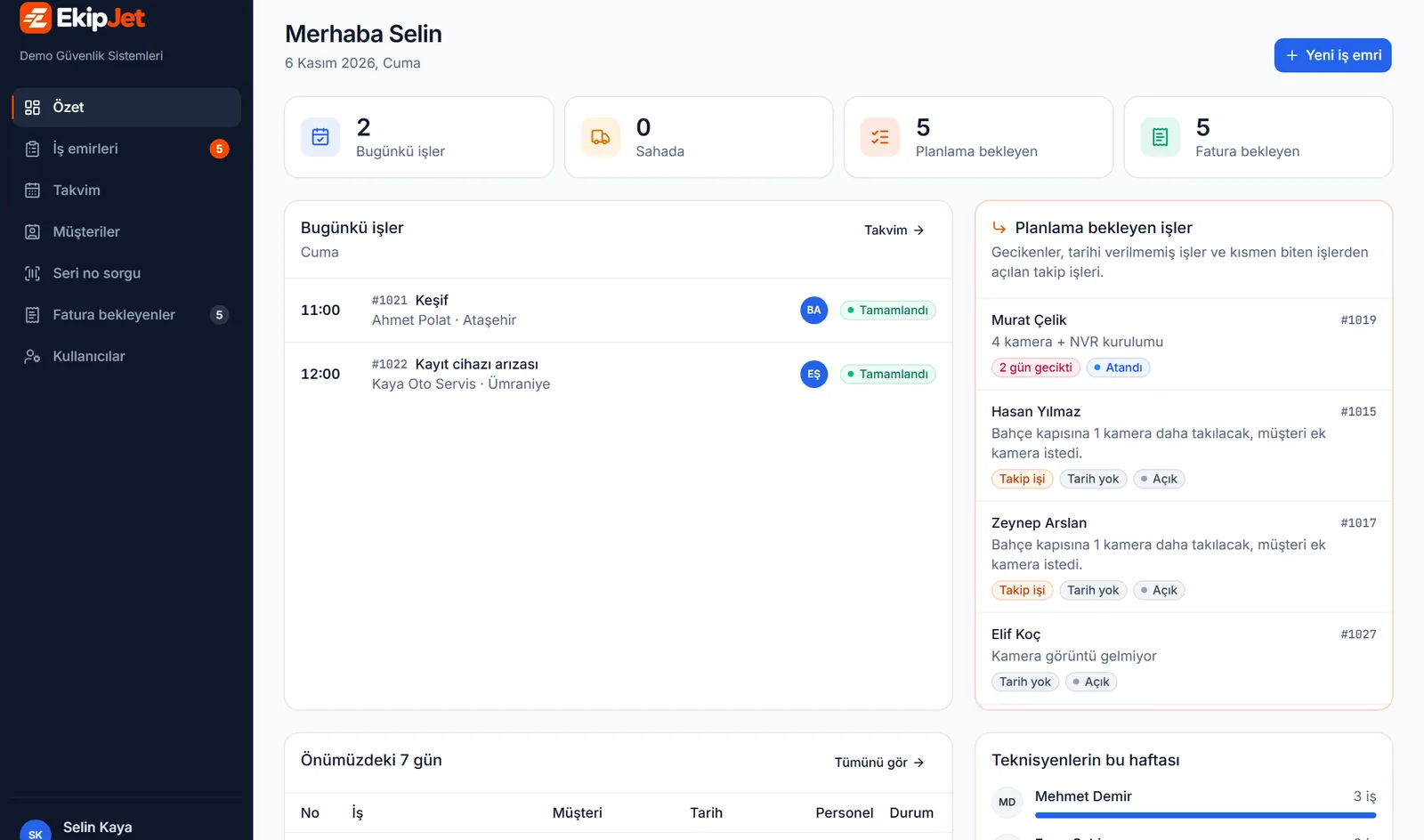
Office panel

Who is where and what is waiting, on one screen

Where the office starts the day. Work to plan, work done and work to invoice are kept apart.

  • Today's jobs and the team in the field
  • Overdue, undated and follow-up jobs in one list
  • Awaiting invoice with one-click serial copy
ekipjet.sixtyfourlabs.net/panel
Office panel: today's jobs and work to be planned
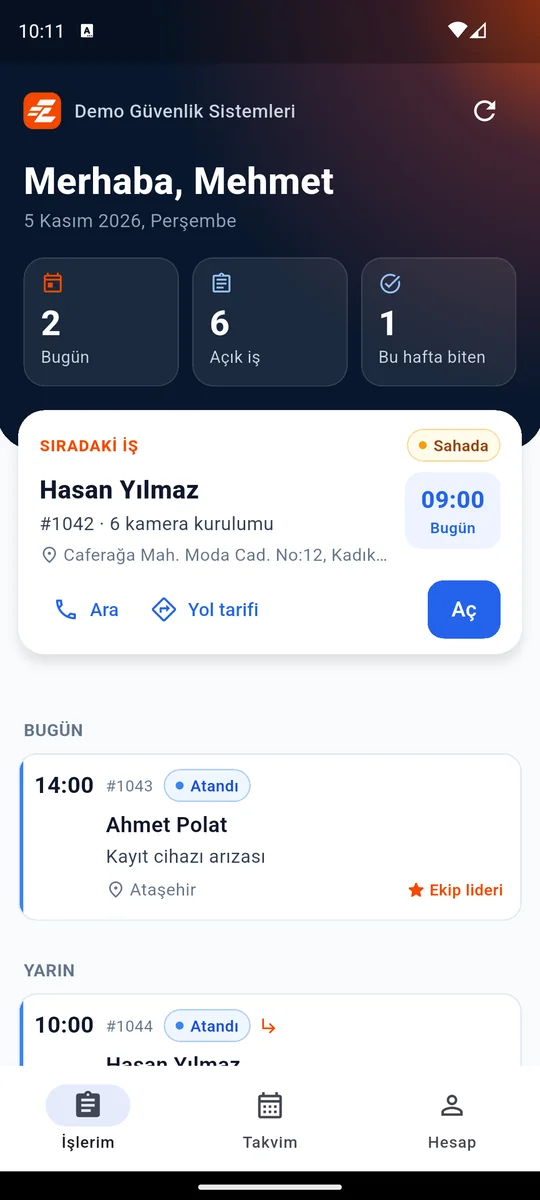
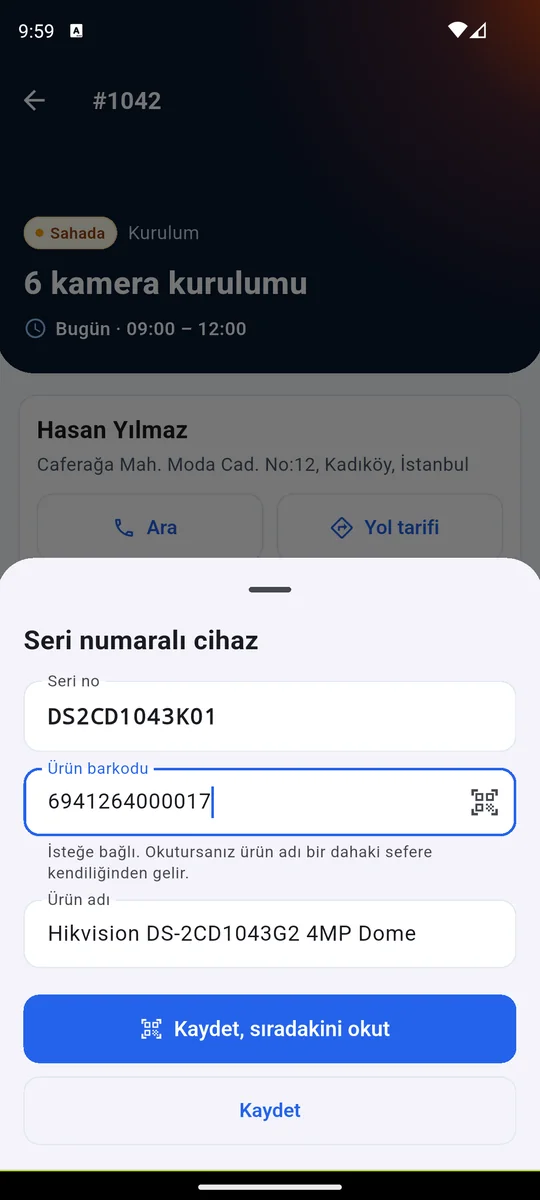
Technician app

The technician scans, the system does the rest

If a box carries several barcodes, tapping the right one is enough. Name a product once and it fills in afterwards.

  • Next job, call and directions in one tap
  • Done or partial; remaining work is required
  • Works offline in basements and on sites
Technician app: my jobs and serial scanning
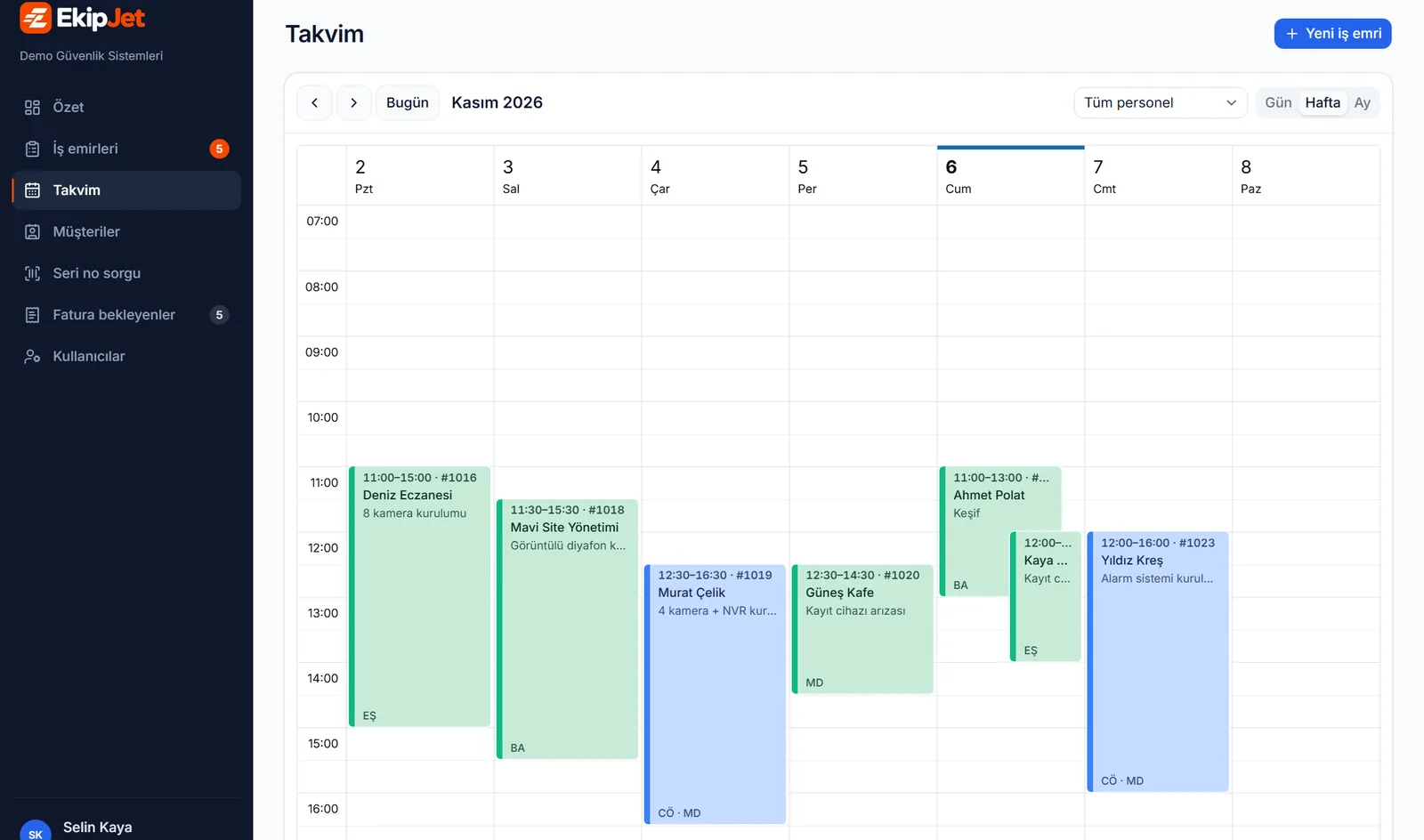
Calendar

The team's week, drag-and-drop planning

Which technician is where on which day, at a glance. Drag a job to a new date and the technician sees the change.

  • Day, week and month views
  • Filter by technician
  • Undated jobs in a side list
ekipjet.sixtyfourlabs.net/panel/calendar
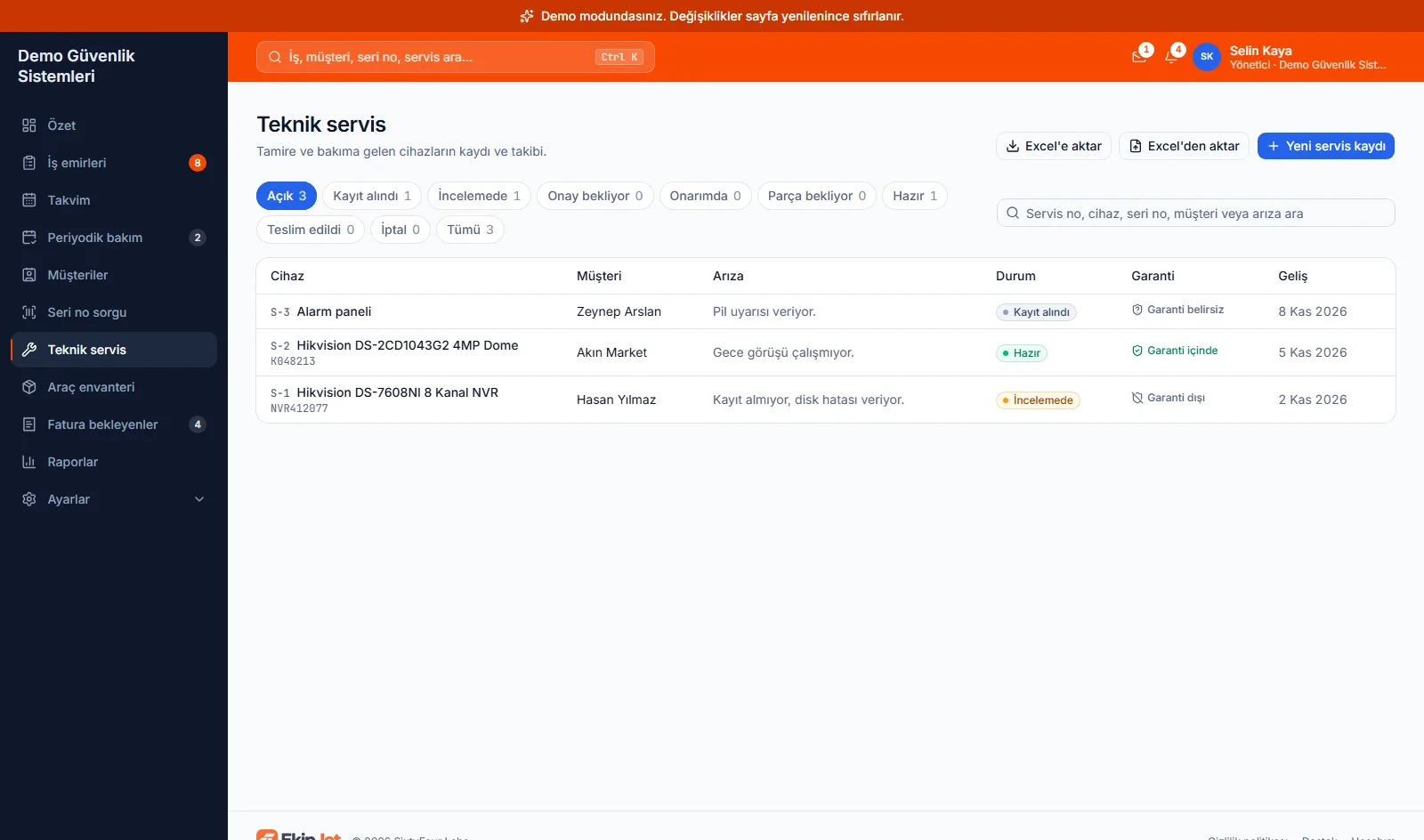
Technical service and workshop

From intake to hand-back, without Excel

Each device handed in is recorded and its intake form printed with a QR code. Check, price approval, repair, parts and hand-back live on one record; the customer follows the device from the link on the QR code.

  • Waiting for approval, ready and late devices on the start page
  • Parts used come off stock and onto the price
  • SMS and WhatsApp to the customer when it is ready
  • Import your old Excel service list at once
ekipjet.sixtyfourlabs.net/panel/service
And more

Small details that save the day

Instant notifications

Everyone assigned gets a notification on their phone.

Periodic maintenance

Yearly fire alarm checks and the like are announced 15 days ahead.

Customer signature and report

The customer signs on the phone; the hand-over report with serials goes out as a PDF.

Device history and warranty

Each serial is linked to customer, address, date and installer.

Team lead and roles

Several people per job; see who accepted and who closed it.

Your firm's data is yours

Each firm's data is separate and invisible to other firms.

AndroidComing soon to Google Play iOSiPhone version on the way

Try it free for 30 days

Open your firm yourself in a few minutes. If you like it, call or write to us and carry on with a monthly or yearly plan.

  • No credit card; your own firm code and users
  • Bring over your customer and service lists from Excel
  • Nothing is deleted when the trial ends; carry on after buying
  • Your data is visible to your firm only
FAQ

Common questions

What if there is no internet on site?

The app works offline. Accepting, scanning and closing are kept on the phone and sent in order once the connection is back.

Does it connect to our accounting software?

Not directly yet. Serials and item lists copy in one click and paste into your accounting software. Tell us what integration you need.

Do we need to set up product cards?

No. The technician scans a barcode and names the product once; the same barcode is recognised next time.

Is there an iPhone app?

Android for now. The iPhone version is on the way.

Where is our data stored?

On servers in the European Union (Frankfurt). Each firm's data is separate and invisible to other firms. See our privacy policy.

How many users can we add?

The number of users depends on your plan and can be raised when you need it.

We only repair at the counter and have no field team. Does it fit?

Yes. Choose "Repair shop only" when you sign up; work orders and the calendar are switched off and the start page shows the devices in your workshop. You can import your old Excel service list too.

What happens when the trial ends?

After 30 days the account becomes read-only; nothing is deleted. To carry on, write or call us and we open your subscription; you continue where you left off.